Foreign transfers
This service offers Íslandsbanki clients the option to send money abroad fast and with minimum effort. The new online bank offers a streamlined, intuitive way to make international payments, create and maintain foreign recipients – all in one place.
Overview of foreign recipients
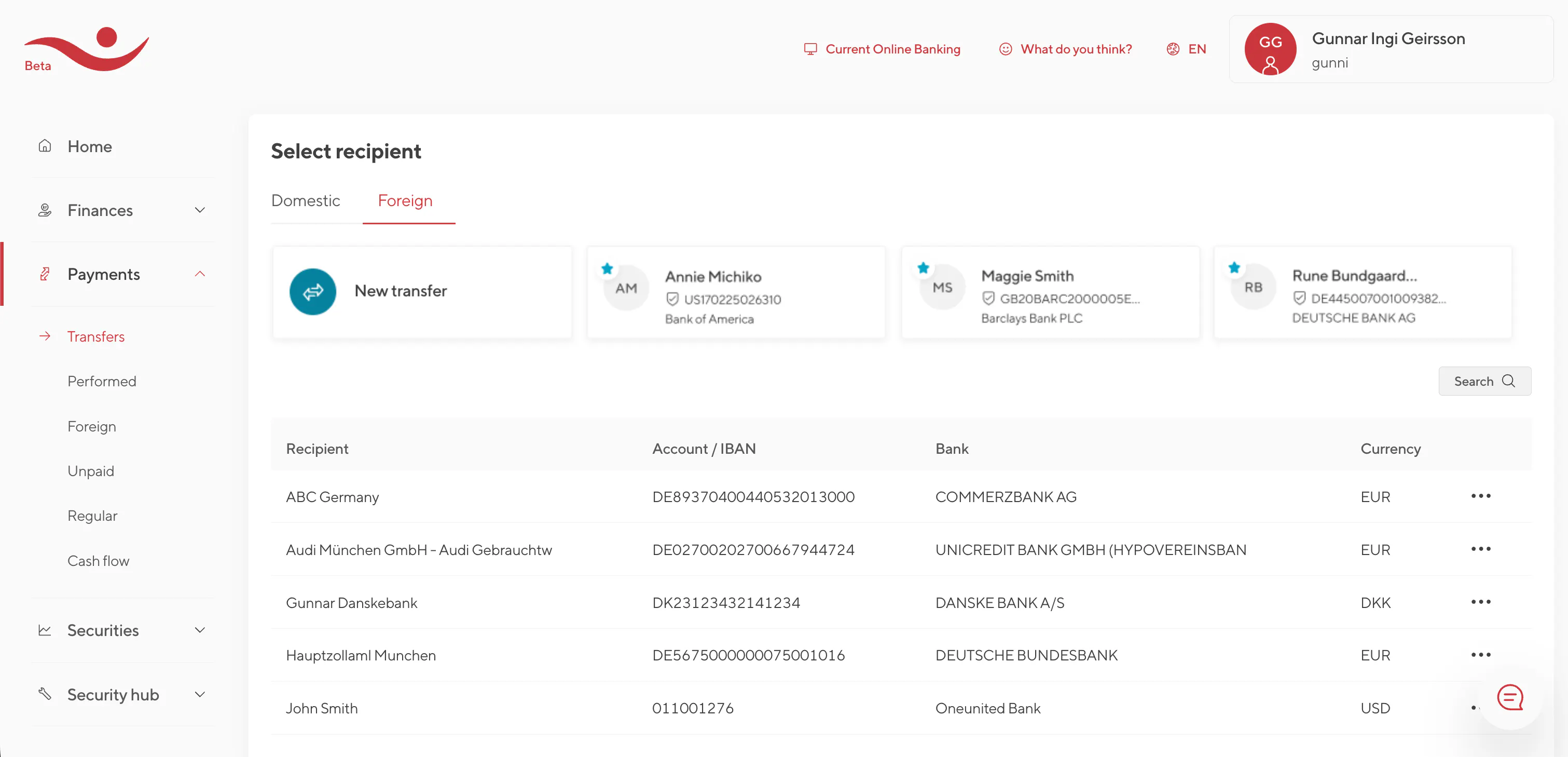
To access the main page for foreign transfers, select Payments in the website's navigation tree and there click on “Transfers”. At the top of the page that opens, there is a button labeled “Foreign.” By clicking it, the foreign transfers start page is displayed. This page displays all foreign recipients the user has saved over time. It is easy to create new recipients, edit, and deleting them.
To begin a transfer, user either clicks a recipient in the table or selects "Transfer" from the action bar on the far right. To transfer to someone the user has never paid before, choose “New transfer”.
On the recipient list, you can search by name or nickname, account number (IBAN), the recipient bank, or the default payment currency. The default currency is the one suggested when setting up a transfer to that recipient, but it can be changed for individual transfers.
Upload/Download recipients
Users can download and upload a list of recipients, for example, simplify the process of creating new ones. To confirm an upload, a strong authentication method must be used.
Quick dial
Recipients can be added to a quick-dial list located at the top of the transfer start page. By clicking a recipient in the quick dial, the user is taken directly to the transfer screen with that recipient pre-selected. This makes it easy to initiate transfers to frequent recipients. The quick dial stores up to eleven recipients and adding or removing entries is easy.

The online bank also provides a quick path from account overviews to start a transfer, where the account the user was viewing is automatically used as the withdrawal account.
Transfer to a new recipient
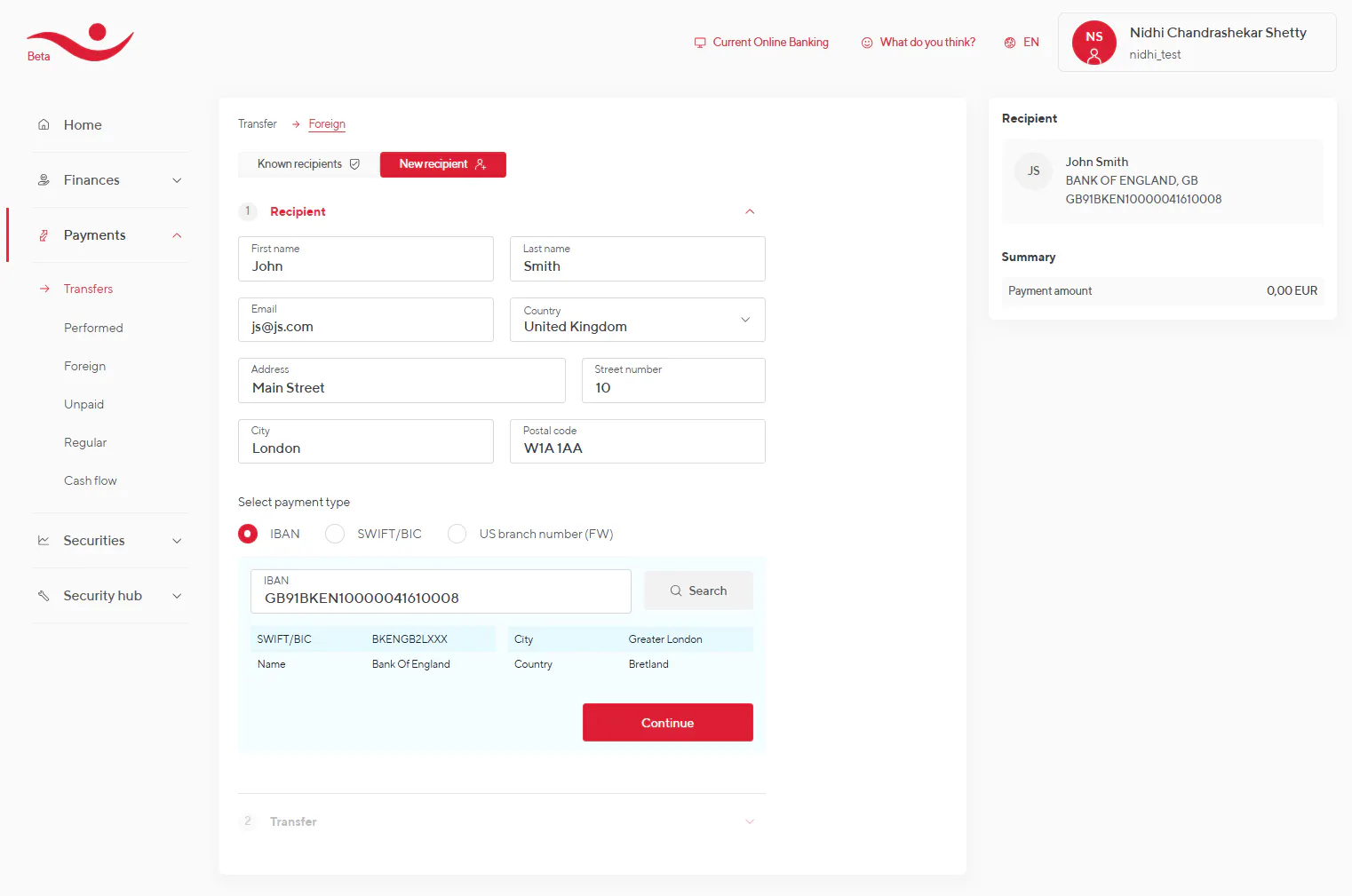
When the user has never transferred to a recipient before, they click “Transfer to a new recipient” to begin the registration process. In such cases, recipient details are entered during the transfer setup, and at the end the recipient can be saved. This action must be confirmed with strong authentication.
The registration form first collects information on the recipient and his/hers bank details. Recipient details include: First and last name, Email, Country, Address (street, postal code, town/city)
Bank details depend on the search criteria selected:
Account number (IBAN)
- IBAN is an internationally recognized format used to identify bank accounts across borders—combining account number, country, and bank into one code (up to 34 characters).
- Here, the user enters the IBAN and the system retrieves bank information based on it.
SWIFT number
- SWIFT (also called BIC) is an 8–11-character identifier for financial institutions worldwide. For example, Íslandsbanki’s SWIFT is GLITISRE.
- Here, the user enters the SWIFT to retrieve bank information. Next, the account number must be provided.
U.S. Routing number
- U.S. routing numbers (ABA, Routing, or Fedwire numbers) are nine-digit codes that identify financial institutions in the United States and Canada.
- These are used for transfers, payments, and deposits.
- Here, the bank information is retrieved by inputting the routing number. Next, the account number must be provided.
High-risk and restricted countries
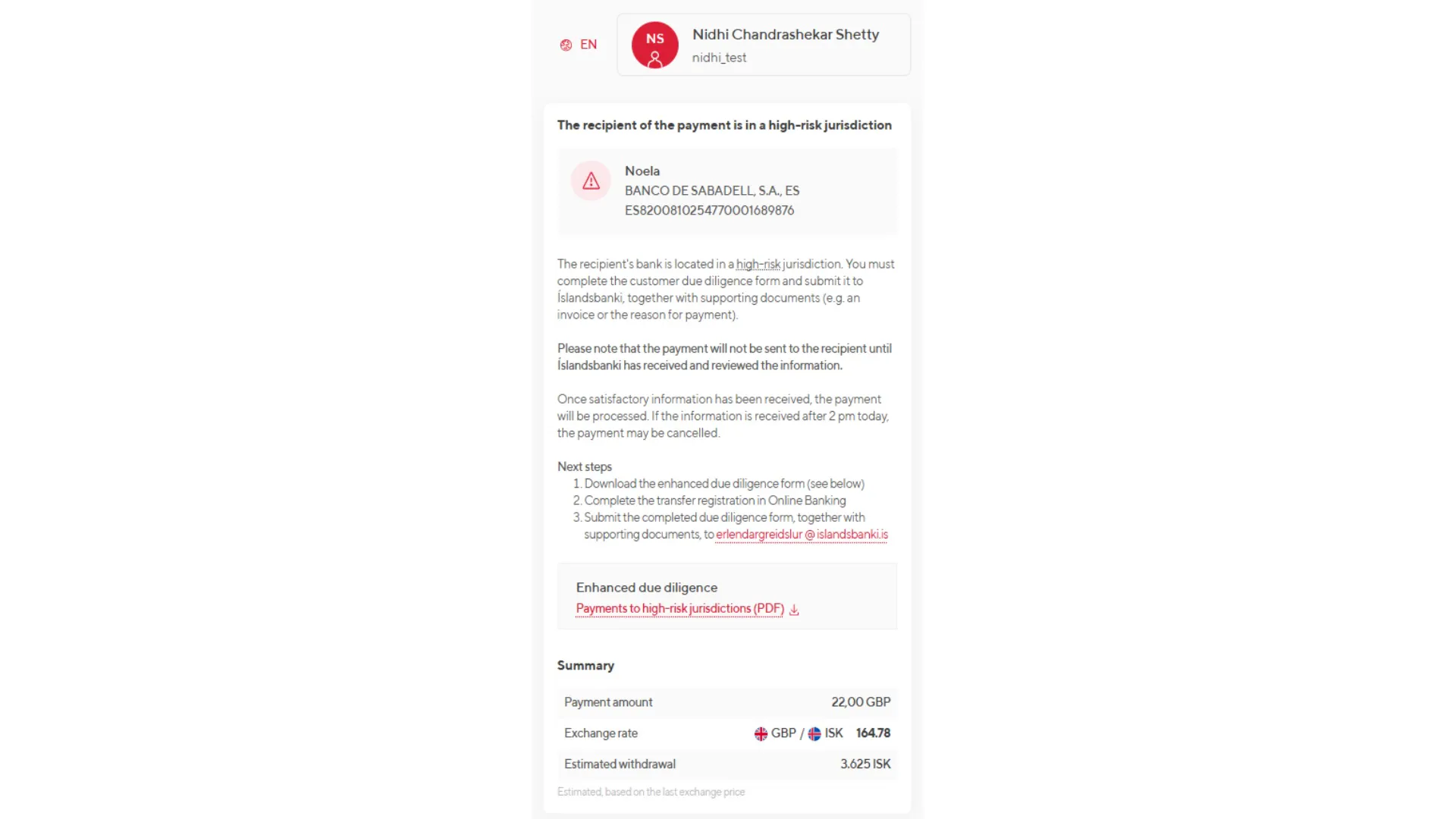
If the recipient bank is in a country deemed high-risk by the Icelandic FSA, the bank search will indicate this. The user will be required to provide additional documentation about the payment - each time a transfer is made to a high-risk country.
If the bank is in a country to which foreign transfers are not allowed, the system will inform the user, and the process cannot continue.
Transfer Entry Page
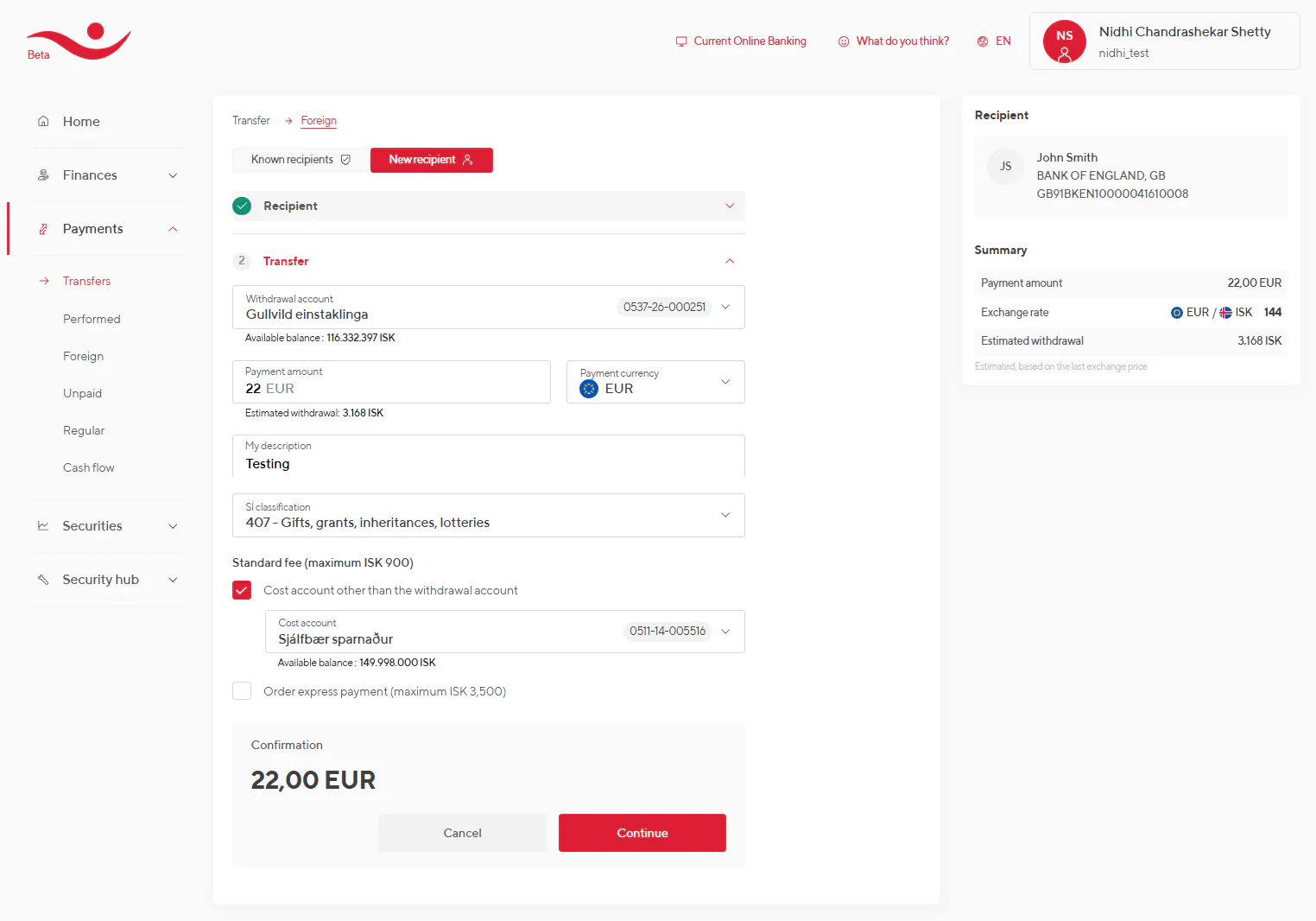
At this stage, the actual transfer is entered. The following transfer types are available:
- Withdrawal from an ISK account and payment to a recipient in a foreign currency.
- Withdrawal from a foreign currency account and payment to a recipient in the same currency.
- Withdrawal from a foreign currency account and payment to a recipient in a different foreign currency (excluding ISK).
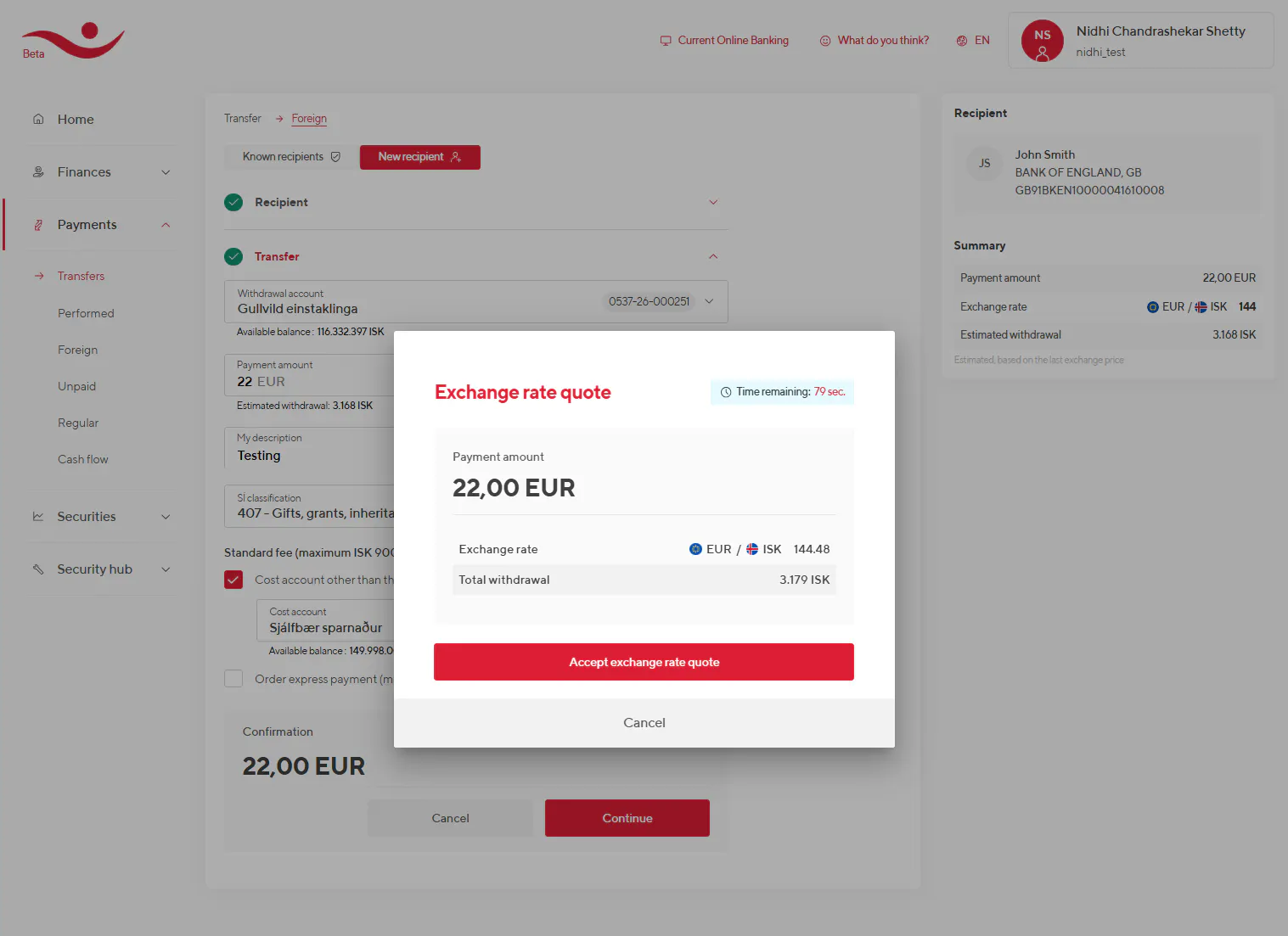
When the withdrawal account and the receiving account hold different currencies, the need for an exchange rate quote depends on how the transfer amount is registered. If the amount is entered in the currency of the withdrawal account, no exchange quote is given, since this is considered a simple withdrawal. However, if the amount is entered in the recipient’s account currency, the user must approve an exchange rate quote within 90 seconds.
If the withdrawal and recipient account both hold the same currency, no exchange quote is needed.
Fees
The standard fee for foreign transfers is 900 ISK, collected as a separate transaction. The user can choose an account other than the withdrawal account to pay the fee.
Express payments
Users can request an express payment to speed up processing. With express payment, instructions reach the foreign bank on the same day, provided the payment is entered before certain cut-off times.
Typical cut-off times are 14:00 for Europe and 17:00 for the U.S. and Canada. Otherwise, processing begins the next business day.
Payments outside opening hours
If a foreign transfer is made outside Íslandsbanki’s FX desk hours (09:15–15:30), the transfer is placed on hold. It is processed at 09:25 on the next business day at the then-current exchange rate.
By confirming the transfer outside opening hours, the user accepts that the exchange rate will be determined later.
High-Risk Countries
If the recipient's bank is in a high-risk country, the user must submit additional information and documentation about the payment. A due diligence form and supporting documents (e.g., invoice or reason for payment) must be sent to Íslandsbanki. The transfer will not be processed by Íslandsbanki until the documents have been reviewed. If documents arrive after 14:00, the payment may be delayed until the next business day.
Confirmation – strong authentication
All foreign transfers require strong authentication methods (Electronic ID, Auðkenni app or Íslandsbanki app).
Because foreign transfers are considered higher risk, the option to skip authentication for small payments (as allowed for trusted domestic recipients) is not available.
Receipt
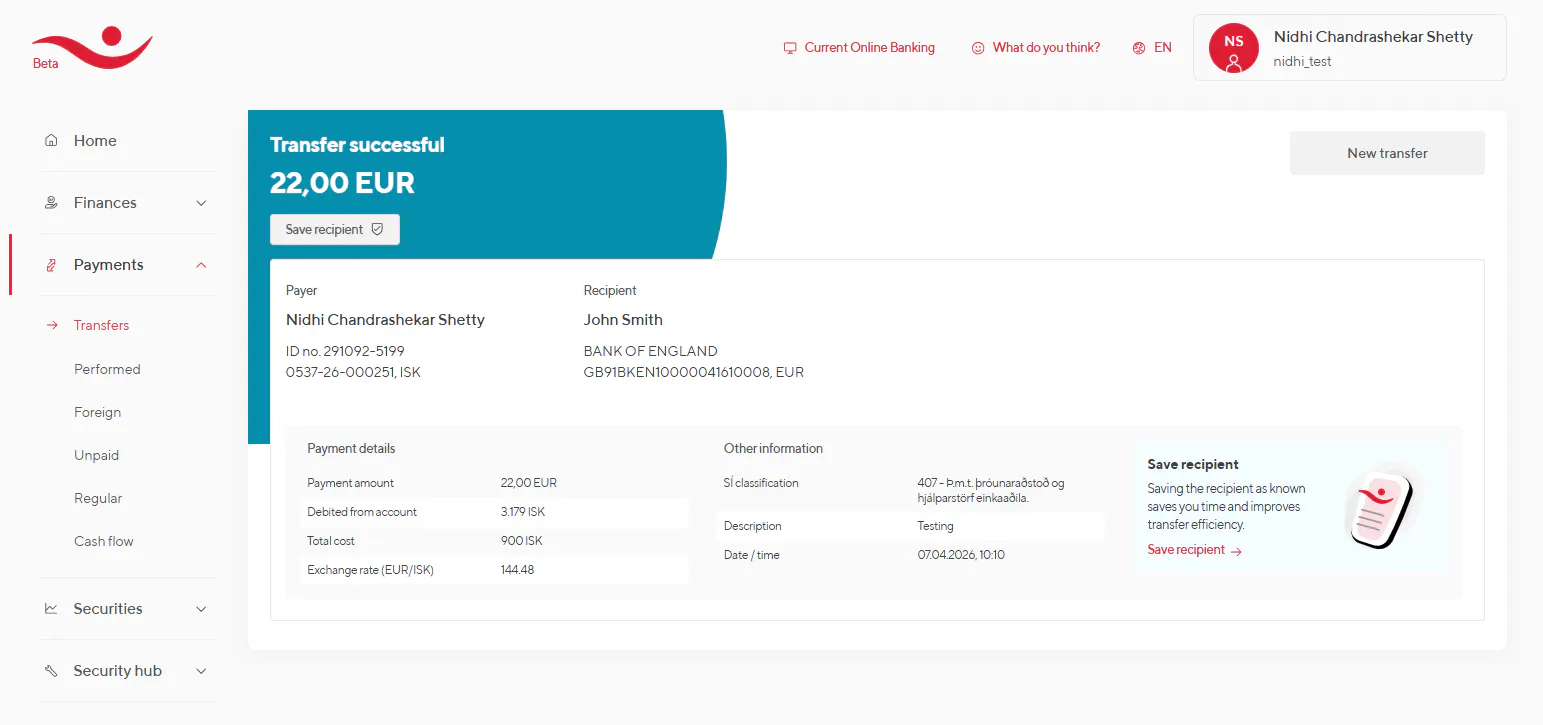
At the end of the transfer process, the user is shown a confirmation of the transaction. The information provided there summarizes all the information that has been registered with the transfer. A receipt can be sent to the recipient, either by email or SMS.
The receipt page offers the option to save the recipient after the first transfer to the relevant party. This gives users a simple option to later transfer money again to the same recipient.